Many dental clinics in the Philippines still keep the patient's chart on paper: a printed odontogram in a folder, marked in pen, with notes in the margins. It works until the folder goes missing, the handwriting is unreadable, or a second dentist at another branch needs to see what was done.
A digital chart solves those problems, but only if it fits how dentists actually chart. This guide covers what to look for, and how the odontogram in EsthetiqOS works.
The numbering system your dentists use
Dentists train on different numbering systems, and a chart that only speaks one of them slows everyone down.
The three in common use are:
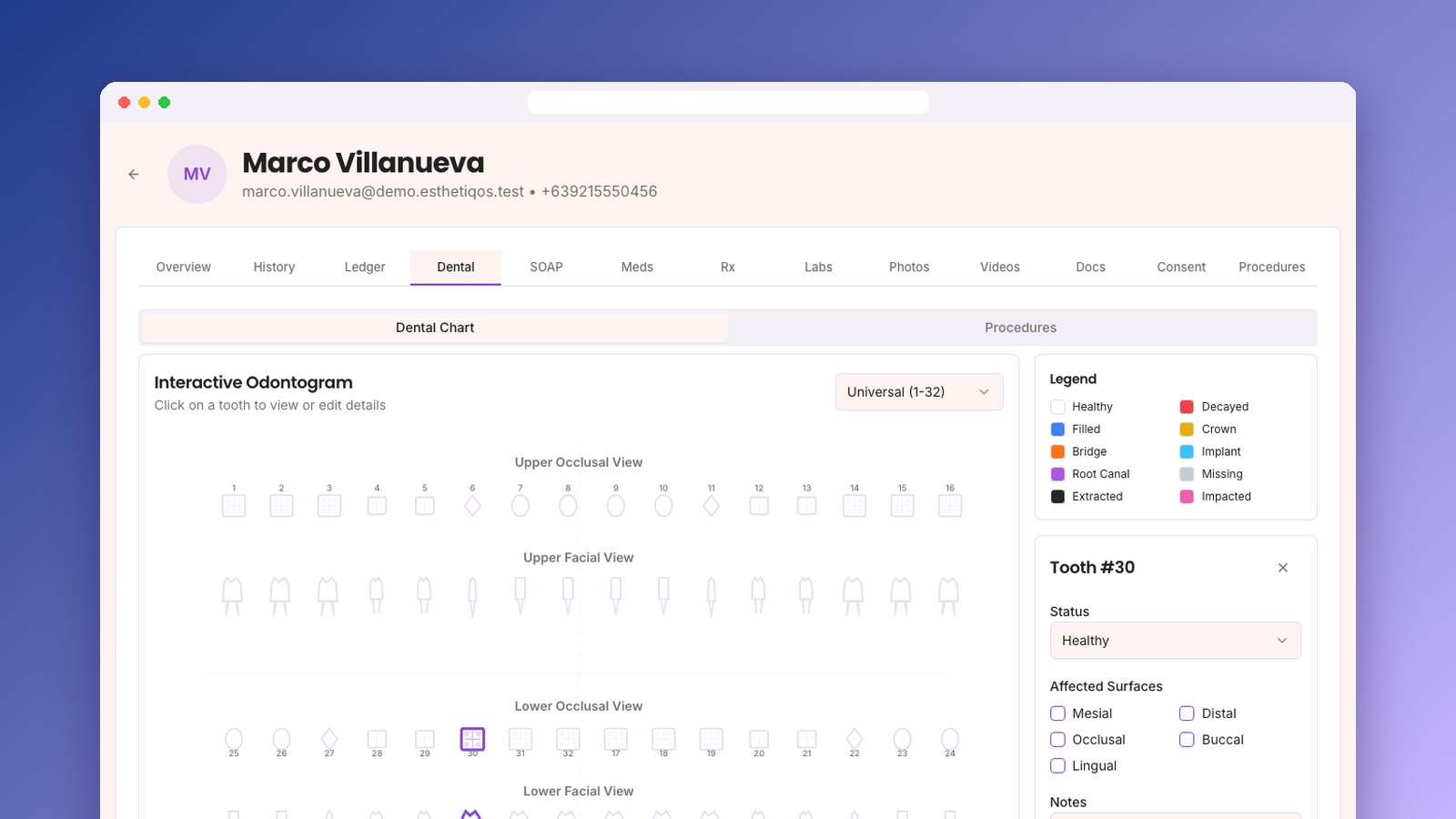
The EsthetiqOS odontogram supports all three. Pick the one your dentists prefer, and the chart redraws in that system.
Clear tooth conditions at a glance
A dentist should be able to open a chart and see the whole mouth in a few seconds. That means a small, fixed set of conditions, each with its own color.
EsthetiqOS uses ten:
Each arch is shown in two views, occlusal and facial, so you see both the biting surface and the front of each tooth.
Surfaces and notes per tooth
"Tooth 30 is filled" is not enough. The next dentist needs to know which surfaces.
In EsthetiqOS, clicking a tooth opens a panel where you set its condition, tick the affected surfaces (mesial, distal, occlusal, buccal, lingual), and add free-text notes. Every change is saved to the clinic's audit trail, so you can see who changed a chart and when.
Planned, in progress, and completed work
The chart shows the mouth today. You also need to track the work: what is planned, what is underway, and what is done.
The Dental tab in EsthetiqOS has a Procedures board with four columns: Planned, In Progress, Completed, and Cancelled. Each procedure records the tooth numbers, date, estimated cost, and notes. A dentist can see at a glance that a patient has a crown planned on 14 and a root canal in progress on 30.
Everything else in the same patient record
A chart on its own is only part of the job. The same patient record in EsthetiqOS also holds:
The Dental tab appears automatically for clinics set up as dental or mixed dental and aesthetic, and you control which staff roles can see it.
Questions to ask any dental software vendor
Whatever system you choose, ask these before you sign:
Getting started
If you are moving off paper, start with new patients. Chart them digitally from their first visit, and convert existing patients as they come back for their next appointment. Within a few months, the folders stop being opened.