Ask any aesthetic clinic owner what they dread at the end of the month and many will say commissions. The doctor did six Botox areas, the nurse assisted on four HydraFacials, two patients paid with a discount, one patient is halfway through a 10-session laser package. Someone has to turn all of that into a number for each person, and the number has to match what was actually collected.
Most clinics do it in a spreadsheet. That works until a discount gets missed, a package session gets counted twice, or a doctor asks "how did you get this figure?" and nobody can show the math.
This guide covers how to set up commission rules that compute themselves, and how EsthetiqOS handles each part.
Step 1: Pick percentage or points
There are two common ways to pay performers in an aesthetic clinic.
Percentage commission
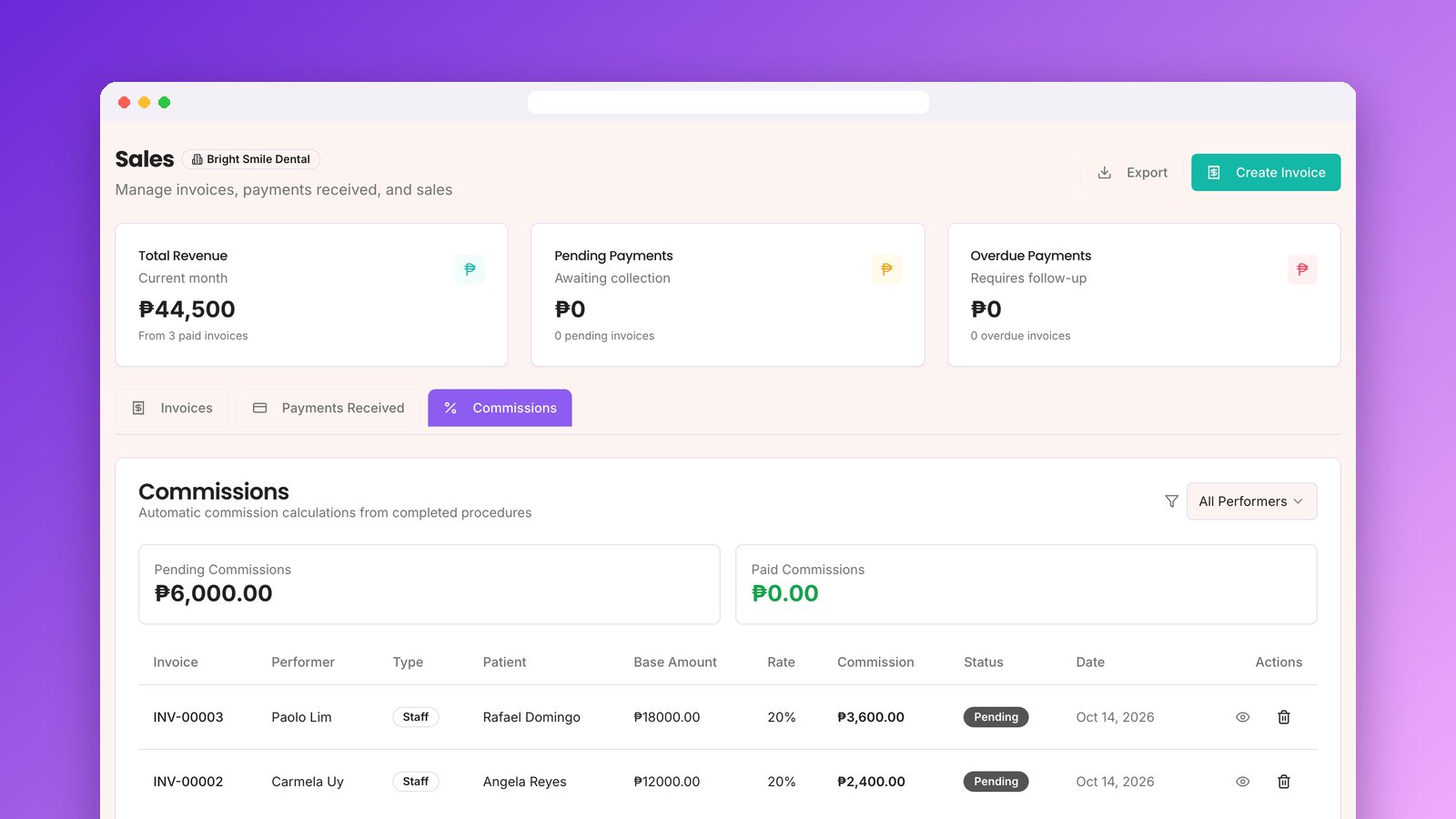
The performer earns a percentage of what the patient paid for the procedure. If a ₱12,000 filler treatment is paid in full and the doctor's rate is 20%, the doctor earns ₱2,400.
This is the most common setup for doctors. It rewards higher-value work and is easy to explain.
Points-based
Each procedure is worth a fixed number of points, no matter the price. A facial might be 5 points, a laser session 8. At the end of the period, points convert to pesos at a rate you set.
Points work well for nurses, aestheticians, and assistants, where you want to reward the work done and not the price the patient paid. In EsthetiqOS you can give the main performer and the assistant different point values for the same procedure.
EsthetiqOS lets each clinic choose one mode in Settings, plus a switch to turn commissions on or off entirely.
Step 2: Decide which rate wins
This is where spreadsheets fall apart. Most clinics have three kinds of rates at once:
You need a fixed order for when they conflict. EsthetiqOS uses this order:
A rate of 0% means no commission for that line. Each doctor or staff member also has their own on/off switch, which is useful for owners who perform procedures but do not take commission.
Step 3: Compute on what was actually collected
Two rules keep commissions honest.
Commission on the discounted amount
If a ₱10,000 procedure is billed at ₱8,000 after a promo, commission should be on ₱8,000. EsthetiqOS spreads the invoice discount across the procedure lines and computes commission on the net amount.
Products do not earn commission
Selling a bottle of sunscreen at the front desk is not a procedure. Only procedure lines on the invoice earn commission. Product lines are left out.
Step 4: Handle packages session by session
Packages are the hardest case. A patient pays ₱30,000 upfront for 10 laser sessions, and the sessions are done by different people over five months.
Paying the full commission on day one overpays whoever did session one. Paying nothing until the package ends is unfair to everyone.
EsthetiqOS divides the package price by the number of sessions and gives each session its share. In the example above, each session is worth ₱3,000, and whoever performs it earns commission on ₱3,000 when the visit is marked complete.
Step 5: Let the invoice trigger it
The cleanest rule is simple: commission is created when the invoice is paid. Not when it is booked, not when the patient walks in.
In EsthetiqOS, the moment an invoice is marked paid, one commission is created for each procedure line, assigned to the person who performed it. That includes doctors with an account and staff without a login, like a part-time aesthetician on your roster. In points mode, points are awarded when the visit is completed instead.
Each commission also posts an accounting entry, commission expense against commission payable, so your books show what you owe before you pay it.
Step 6: Review and pay out
At the end of the period you need three things: what each person earned, what is still unpaid, and a record of what you paid.
In EsthetiqOS:
When a doctor asks how a number was computed, you open the line and show them the invoice, the base amount, and the rate.
A worked example
Here is one day at a small clinic with a 20% clinic default:
Total for the day: ₱3,000 for Dr. Reyes and ₱1,900 for Dr. Santos. Nobody had to touch a spreadsheet to get there.
Getting started
If your clinic still computes commissions by hand, start by writing down your rules: the mode, the clinic default, and any person or procedure exceptions. Once those are set in EsthetiqOS, every paid invoice computes itself.